Talos Manager: One Place for Many Talos Clusters
Three Talos Linux clusters, three subnets, six machines, and a growing list of questions that a spreadsheet answers badly: which hosts are alive in which subnet, which of them are already part of a cluster and which are still waiting in maintenance mode, which cluster runs which Talos and Kubernetes version, and who on the team is allowed to see any of it.
Talos Manager is the small web app I built to answer those questions. This post is about what it does for the person operating the fleet, not how it is built. The build story, prompts and all, is in Vibe Coding a CRUD App.
Here is the whole thing in 84 seconds, recorded against the real clusters: networks, a subnet scan, a cluster sync, and one machine's page section by section down to its logs.
The Four Things It Knows About
| Thing | What it means | Where it comes from |
|---|---|---|
| Network | A subnet your Talos nodes live in, by name and CIDR | you define it, or import a CSV |
| Machine | One physical or virtual host running Talos | found by scanning the network, or added by hand |
| Cluster | A Talos Kubernetes cluster, onboarded with its talosconfig | you provide the config once |
| Team | People who share access to networks and clusters | you create them |
The order in the navigation bar follows the way work actually flows: Networks, then Machines, then Clusters, then Teams. You describe where machines can be, you find them, you group them into clusters, you decide who sees what.
1. Networks: Where to Look
A network is just a name and a CIDR, like subnet-p00 and 10.1.1.0/26, with an optional description. That's deliberately all. Networks are the search space for everything that follows.
Networks can be shared with people or with whole teams as viewers or editors. Someone who can edit a network can scan it and add machines to it; someone who can only view it sees its machines and nothing more.
2. Machines: Found, Not Typed
This is the part that replaced the spreadsheet. Talos nodes listen on port 50000 for their management API, whether they have joined a cluster or not. Scanning a subnet for that port finds every Talos host in it, and asking each one a question without any credentials tells you which lifecycle state it is in:
- maintenance: the node booted Talos but has no configuration yet. It answers openly and tells you its hardware identity, version, disks and network links. This is a machine waiting to be made part of a cluster.
- provisioned: the node belongs to a cluster. It still listens, but politely refuses anyone without that cluster's certificate. You know it is there and that it is somebody's.
- unreachable: it answered before and does not now.
- unknown: added by hand, never probed.
Scanning runs three ways, all doing the same thing: a Scan now button on the network page, a scheduler inside the app that scans every network on an interval, and a command-line tool for running it from a laptop on the VPN when the hosted app cannot reach the subnets.
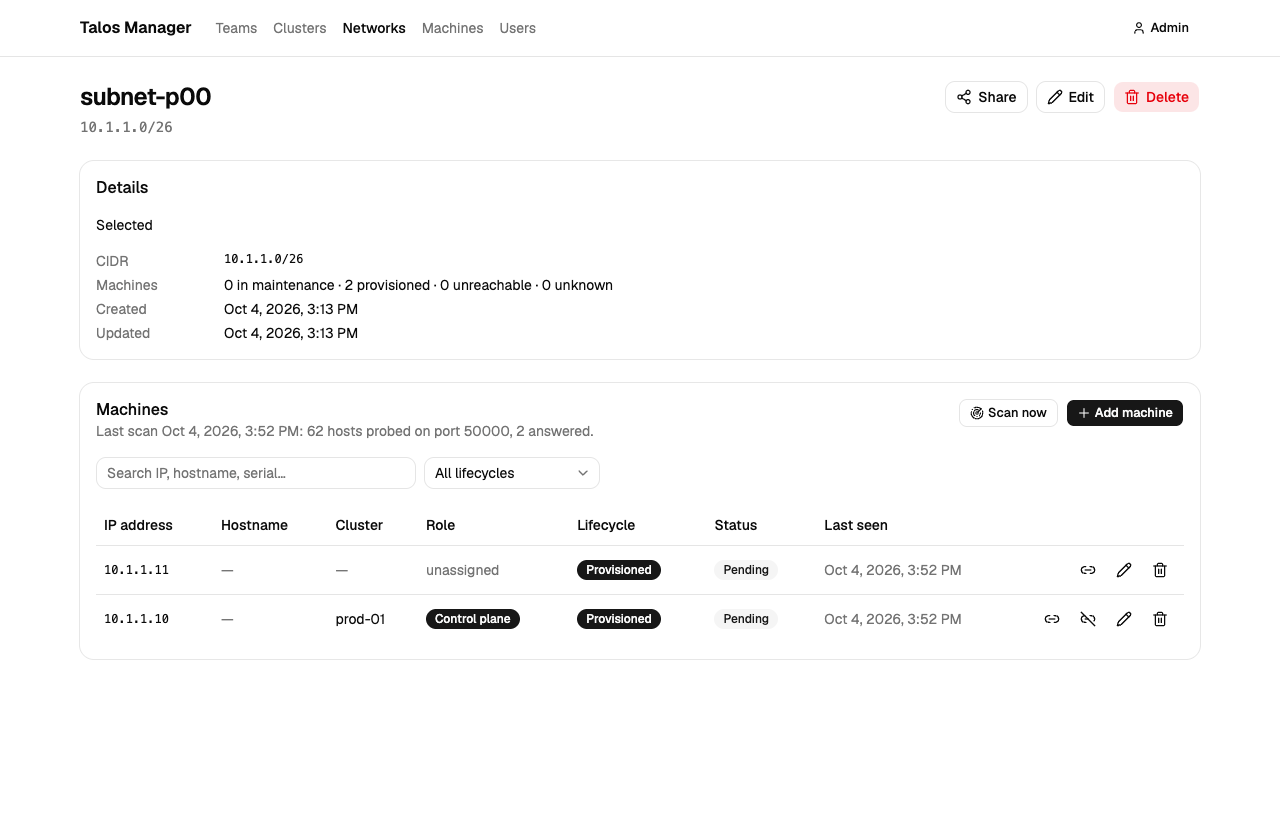
A few rules keep the inventory honest:
- A machine is never deleted by a scan. If it goes silent it becomes unreachable; a human decides whether to remove it.
- A machine you added by hand that has never answered is left alone by scans. It is your note, not the scanner's finding.
- A scan on one port says nothing about machines recorded on another port.
- The IP address is how a machine is first recognised, but it is not its identity. As soon as a node tells us its hardware UUID, that becomes the key, and a machine that shows up at a new address is recognised as the same machine that moved.
3. Clusters: Provide a talosconfig, Get the Rest
A cluster is onboarded by providing its talosconfig, the same file talosctl uses. From it the app learns the Talos endpoints and default nodes, derives the Kubernetes API address when you leave it blank, and checks that it can connect, filling in the Talos version when it can.
The talosconfig is root on every node in the cluster, so the app treats it as a write-only secret. It is never shown again, never appears in any response, and cannot be downloaded, not even by an administrator. You can replace it or clear it. The app uses it on your behalf and that is all.
Then the one button that does the heavy lifting: Sync.
- It asks the cluster for its members: every node's hostname, addresses and whether it is a control plane or a worker. Nodes named in the talosconfig that the cluster's own discovery has not reported yet are asked directly, so a freshly joined worker is not missed.
- Each member is matched to a machine in your networks by address, or created if it is new, and assigned to the cluster with the role Talos reports.
- Each node is asked for its identity and version with the cluster's certificate.
- The app fetches the cluster's Kubernetes admin credentials through Talos, uses them once to read the Kubernetes version and the node list, and throws them away. Node Ready conditions become machine statuses; the control-plane label confirms roles.
- Finally the cluster's own status is derived: every member reachable and every node Ready gives ready, anything less gives degraded. A cluster you have marked as deleting is left alone, because that is your intent, not a measurement.
Sync is idempotent. Run it again and it reports "already here" for everything it has seen before. Machines that are assigned to the cluster but no longer appear in its member list are reported, not removed. Machines that Talos says belong to a different cluster are reported, not moved.
4. The Machine Page: Everything About One Node
Clicking any machine opens its page, with a section list on the left that jumps the content pane to the right place while the header stays put.
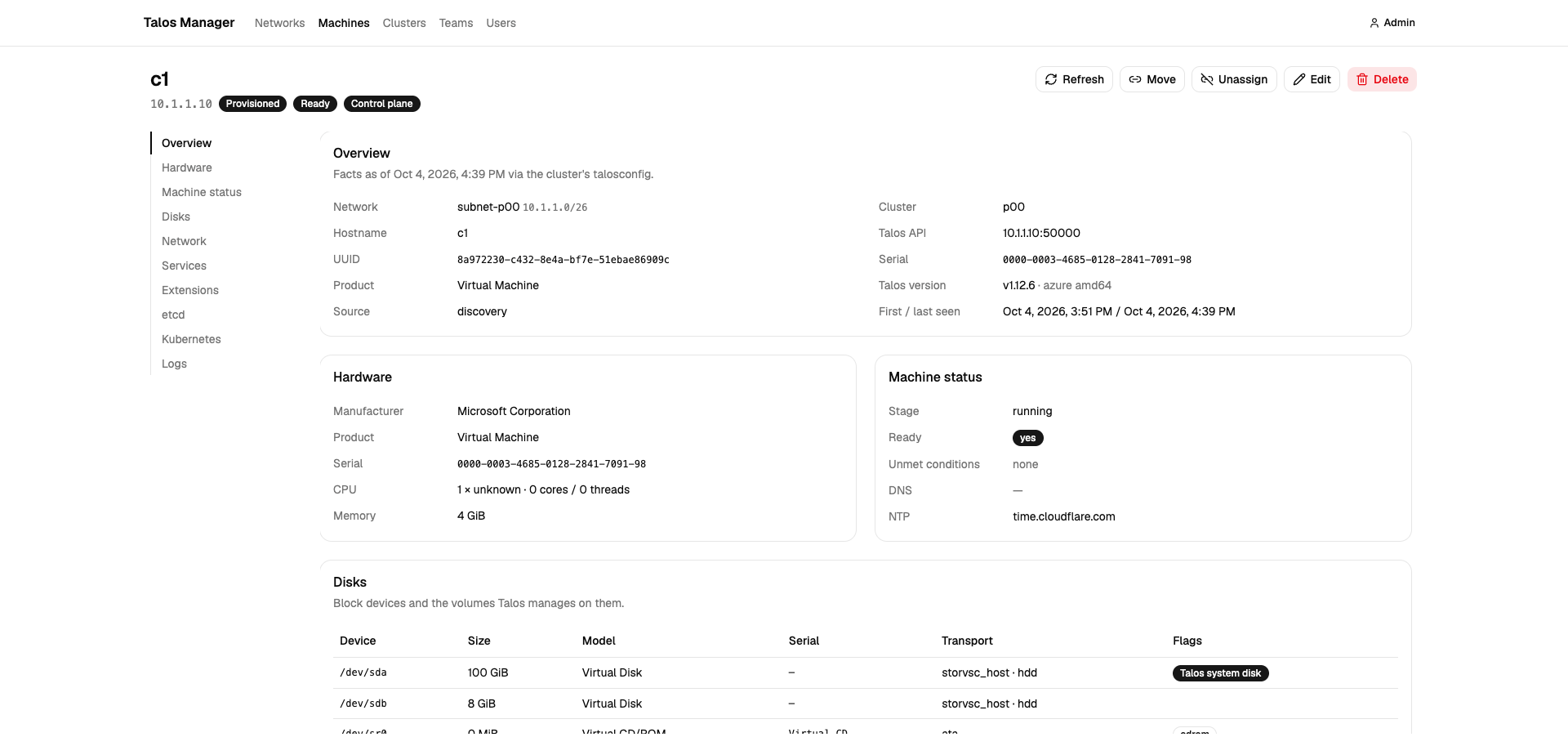
What's on it:
- Overview: network, cluster, role, status, lifecycle, UUID, serial, product, Talos version, first and last seen.
- Hardware: manufacturer, product, serial, CPUs, memory.
- Machine status: Talos's own stage and readiness, with any unmet conditions, plus DNS and NTP servers.
- Disks: each block device with size, model, transport and which one holds Talos, and the volumes Talos manages on them with their phase and filesystem.
- Network: every link with MAC, state, speed, MTU, driver and addresses, then the gateway routes.
- Services: Talos system services with state and health.
- Extensions installed on the node, and etcd members on control planes.
- Kubernetes node: kubelet, OS image, kernel and runtime versions, all node conditions, taints, labels, allocatable CPU and memory.
- Logs: the last 200 lines of any system service, or the kernel log, fetched from the node when you ask.
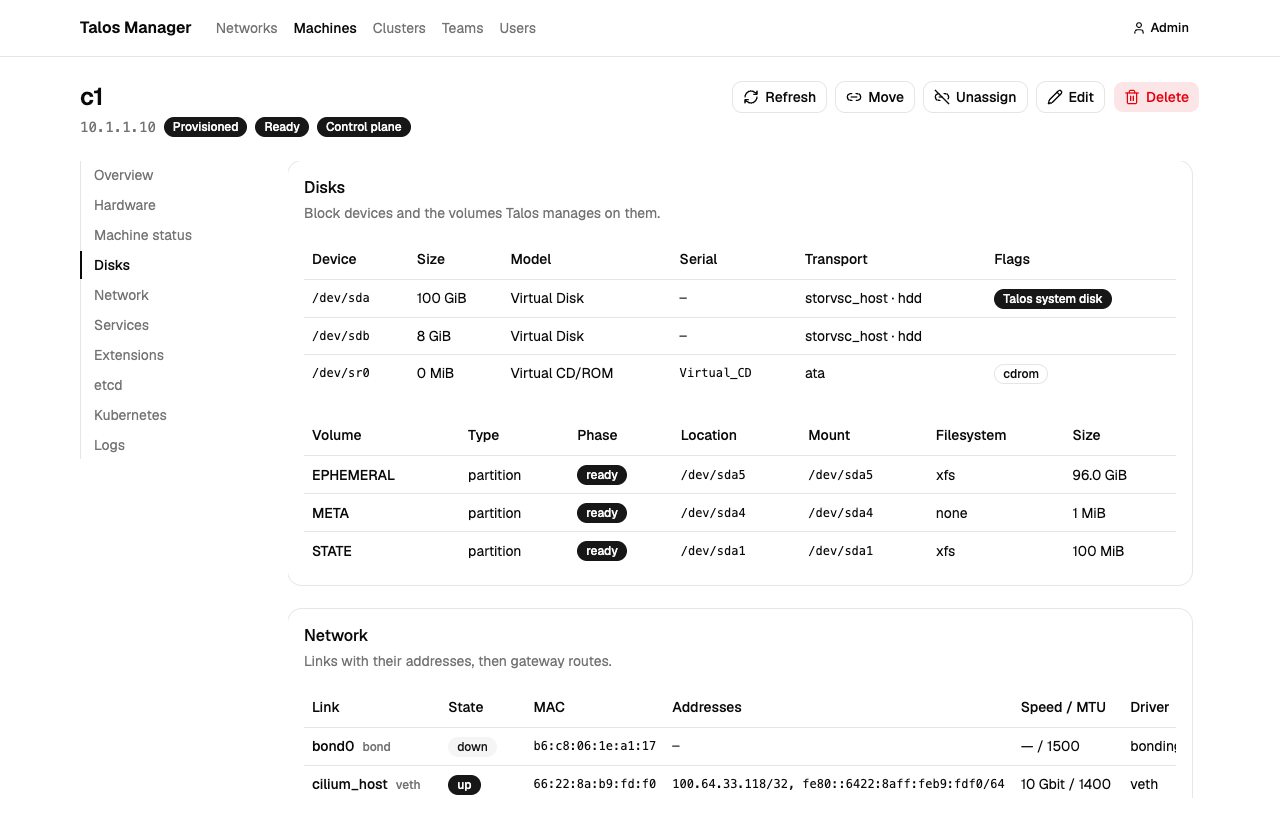
Everything on the page is a snapshot, stamped with the time it was taken. Snapshots are refreshed periodically by the scheduler and on demand with Sync or Refresh; logs are fetched when you ask for them, the last 200 lines as they are at that moment. None of it is a live feed, and that is deliberate: a snapshot is useful even when the app cannot reach the node right now, and it keeps the page honest about what it knows and since when. Live monitoring of a running fleet is a different story for another day.
5. Who Sees What
Two layers, both simple from the outside:
- A role says what you may create: administrators do everything, members can create networks, clusters and teams, viewers create nothing.
- Sharing says what you may see and touch: the creator of a network or cluster owns it and can share it with people or teams as editors or viewers. Machines inherit from the network they were found in and, once assigned, from their cluster, so sharing a cluster with a team shows them its machines without any extra clicks.
Deleting follows the same inventory mindset. Deleting a cluster releases its machines back to unassigned; it does not delete them, because the hardware still exists. Deleting a network that still has machines is refused until you have dealt with them.
Where the UI Stops and the Workflows Begin
Talos Manager is the inventory and the control panel, not the hands. Assigning a machine to a cluster in the UI records an intent: this machine, in that cluster, with this role. Carrying it out is the job of infrastructure workflows that run the actual runbooks, the kind of thing you build with Temporal or Argo Workflows and keep under version control.
The two workflows that matter most:
- Adding a node. A machine in maintenance mode is assigned to a cluster. The workflow picks up that intent, generates the machine configuration for its role from the cluster's secrets, applies it to the node, waits for it to reboot and join, and Talos Manager's next sync sees it arrive as a provisioned, Ready member.
- Removing a node. A machine is unassigned from a cluster. The workflow drains and removes the node from Kubernetes, resets the Talos installation so the host returns to maintenance mode, and the next scan finds it back where it started: a blank machine waiting for its next job.
That is ordinary infrastructure automation, and keeping it outside the UI is the point. The UI gives people a safe place to express what should happen and to see what did happen; the workflows do the dangerous parts deliberately, with retries, approvals and an audit trail of their own. The app's job is to make sure the workflow, and the person who triggered it, know exactly which node is about to change.
How much of this you automate is a matter of volume, not principle. With three clusters and a handful of machines, a person clicking Assign and then running the runbook from a terminal is perfectly fine, and the UI is already the better part of the value. With dozens of clusters and nodes arriving every week, the workflows earn their keep and GitOps starts to make sense as the record of intent. Automation here is on a need basis, not a must.
What you do not need, at any volume, is a controller reconciling in a loop. A Talos machine configuration is written once when the node joins and then does not change; nodes do not drift the way a fleet of hand-managed servers does. An event when a machine is assigned or unassigned, handled by a workflow that runs to completion, is the right shape for it. Continuous reconciliation would be solving a problem Talos already removed.
Metrics, events and alerting are observability, and that is a different tool for a different day.
Summary: The Flow
- Define the networks your nodes live in
- Scan them; machines appear with their lifecycle state
- Provide a talosconfig per cluster; the app checks it and fills in versions
- Sync; members become machines with roles, identities and Kubernetes status
- Open any machine to see its hardware, disks, links, services and logs
- Share networks and clusters with teams; viewers see, editors act
- Run the scanner on a schedule, from the app or from a VPN host
- Assign or unassign machines in the UI; the infrastructure workflows provision and reset the nodes
Three clusters, six machines, every one of them with a known identity, a known role and a known state, and a page that tells you everything about it before you touch it. The spreadsheet did none of that.